Log the purchase
Allocate each collection’s cost across the items you enter. Track remaining stock at what you paid.
FOR MTG & TRADING-CARD SELLERS
Check a sale after fees and postage. Then use the Seller Workbook to track collection costs, sold cards and cash tied up in stock.
No signup needed · USD · manual entry
01 / TRY ONE SALE
Use your own numbers. The example fee rate is illustrative and isn’t a current marketplace quote.
PROFIT BEFORE INCOME TAX
After purchase cost and the selling costs entered.
Excludes unentered expenses and the value of your time.
Break-even keeps shipping collected and tax at the amounts entered, and rounds the item price up to cents. Percentage fees apply to the item amount, shipping and entered tax. Marketplace caps and exceptions are not modeled.
Open the downloaded XLSX in Excel, or import it into Google Sheets to make your own working copy. Replace the example numbers with one sale. Keep each input currency consistent; this version displays USD. Use a desktop or laptop for spreadsheet editing.
Need a sales history and inventory totals? Compare the free calculator with the Seller Workbook
02 / TRACK THE WHOLE COLLECTION
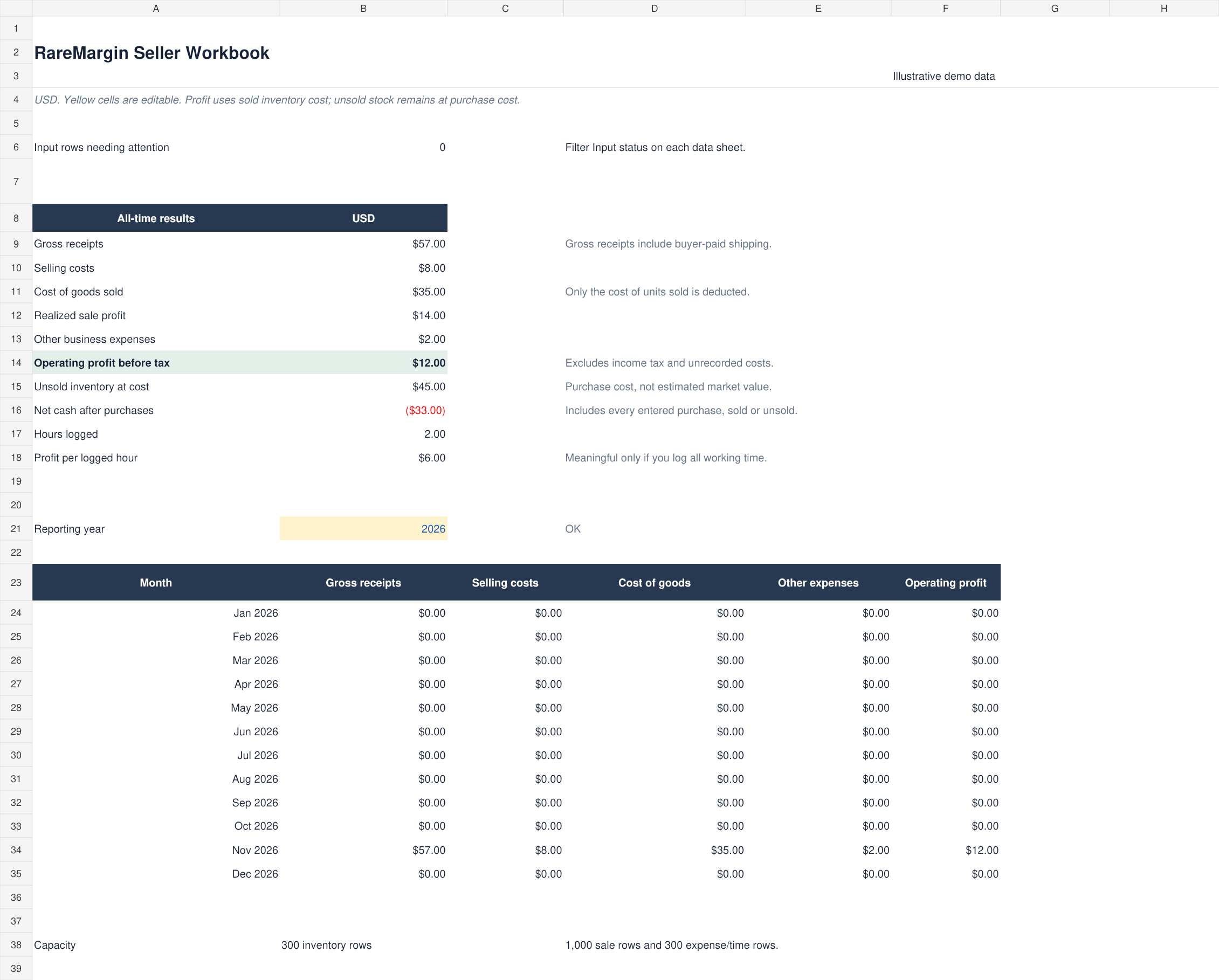
The Seller Workbook connects what you bought with what you sold, so you can see profit and unsold inventory separately.
Overview · illustrative demo data
$12 USD · one-time
ZIP download: one editable XLSX workbook + start instructions
Built for sellers who enter their own transactions. Live prices and automatic marketplace imports are not included.
Tested in Excel for Mac. Google Sheets calculation checks passed. See software details.
One-time purchase. Download through Gumroad. Read refund exceptions.
Buy the workbook — $12Allocate each collection’s cost across the items you enter. Track remaining stock at what you paid.
Record proceeds and actual costs. Manually split shared fees, postage and packing across the order’s item rows once.
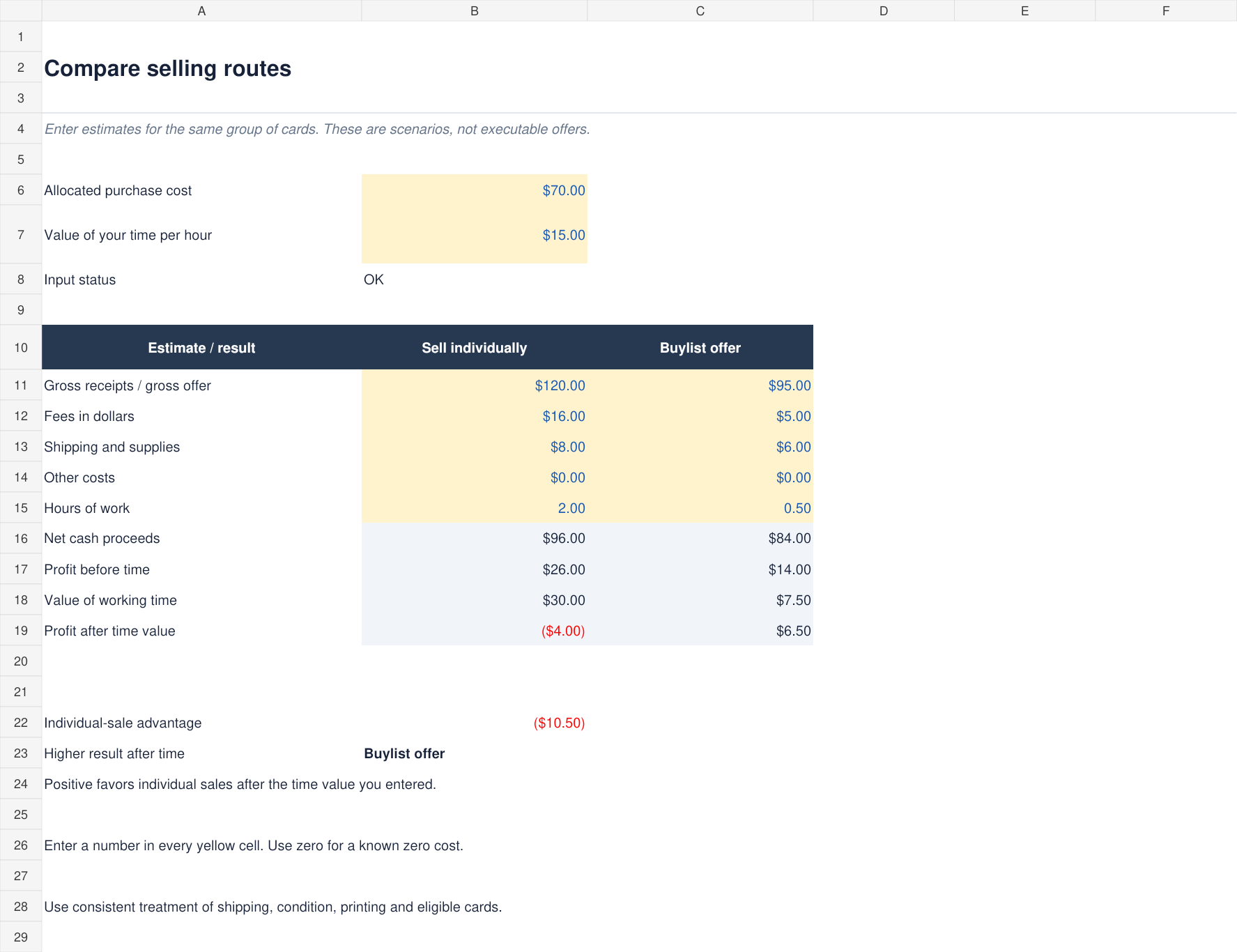
See realized profit, working time and money tied up in unsold cards. Compare selling routes using your estimates.
WHY USE THE SELLER WORKBOOK?
For example: buy 10 cards for $50. Sell four for $40, collect $2 shipping and pay $8 in selling costs.
$42 received − $8 costs − $20 purchase cost of the sold cards.
Six unsold cards still carry $30 of the original purchase cost.
$42 received − $8 costs − the full $50 collection purchase.
Fictional example with equal purchase cost per card and no additional expenses. The workbook separates these totals so unsold stock doesn’t look like realized profit.
CHOOSE THE RIGHT TOOL
The free calculator checks a transaction. The Seller Workbook keeps the purchases, sales, expenses and remaining stock together.
| What you need | Free calculator | Seller Workbook |
|---|---|---|
| Main job | Check one sale’s fees, profit and break-even. | Track purchases, sales and unsold inventory. |
| Running records | No saved sales history in the browser. | 300 inventory entries and 1,000 sales rows. |
| Expenses & time | Include costs for the sale you enter. | 300 expense/time rows, plus profit per logged hour. |
| Business totals | One transaction at a time. | Monthly and all-time profit, cash after purchases and stock at cost. |
| Selling routes | Single-sale calculation. | Individual-sale vs. buylist estimates, including an optional value for your time. |
| File | Free single-sale XLSX. | One ZIP with the XLSX workbook, empty input tables, a built-in Guide and separate start instructions. |
Manual input throughout. The Seller Workbook uses actual dollar fees. Neither tool calculates income tax or imports marketplace transactions automatically. The workbook has no macros and does not connect to selling accounts.
A FEW DETAILS
Use a desktop or laptop with Excel for Mac, or import the XLSX into Google Sheets. Both files passed calculation checks in those apps. Excel for Mac 16.114.3 also passed reopening, dropdown, filter and sort checks. Windows Excel and Excel for the web have not been tested; Google Sheets filtering and sorting have not been visually checked.
Yes. Import the XLSX into a native Google Sheets spreadsheet to make your own working copy. Calculation checks passed in native Google Sheets; its interactive filtering and sorting have not been visually tested. The free download starts with illustrative numbers, and the Seller Workbook starts with empty input tables.
Refunds are available for duplicate purchases or technical problems we cannot resolve. Email raremargin.tools@gmail.com with your order details. Change-of-mind refunds are not offered for this downloadable workbook. Any refund rights required by law and Gumroad’s policies still apply.
No. You enter your own purchases, sales and costs. The workbook shows unsold stock at purchase cost, not estimated market value.
You can track any trading cards. Use a unique item ID for each printing, condition and acquisition cost. This is independent bookkeeping software and is not affiliated with a card publisher or marketplace.
The free calculator estimates fees from the rate and fixed fee you enter. The Seller Workbook uses actual dollar fees, so it does not need to assume which marketplace tier or exceptions apply to you. For a refunded sale, enter the fees the marketplace actually kept in the workbook; reducing the sale price in the free calculator would also reduce its estimated fees.
Split a collection’s total purchase cost across its inventory rows once. Split shared fees, postage and packing across the order’s sale lines once. For example, a $100 purchase can be allocated as $60 and $40; entering $100 on each row would double the cost.
Revise the original sale to the quantity the buyer kept and the money you retained. Keep unrecovered costs. This restates the original sale month; it is an operating tracker rather than a tax accounting system.
The calculator runs in your browser and does not send the entered amounts to a server. Entered amounts are not saved after you refresh or leave the page. Copying uses your clipboard only when you press the button. Download the free XLSX if you want to save your work in a file.
RareMargin is the new brand. The current verified XLSX files and workbook previews still use the original Card Seller Ledger title; the calculations and features are the same.